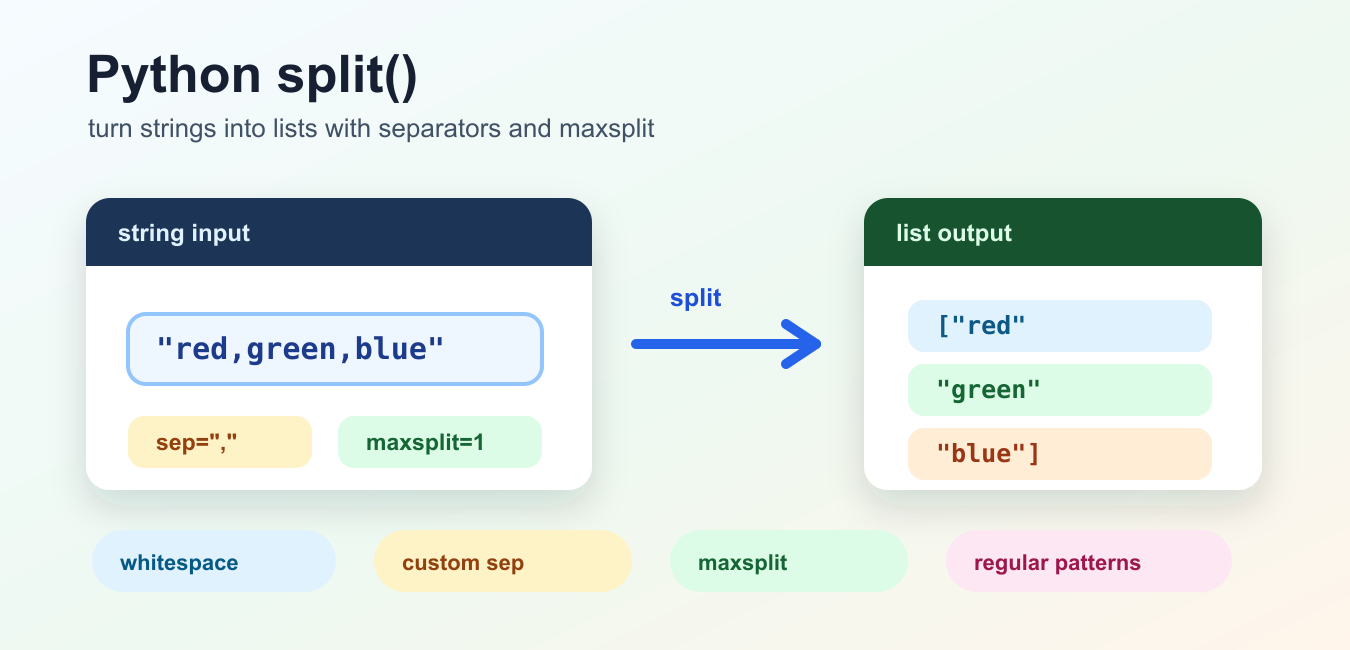
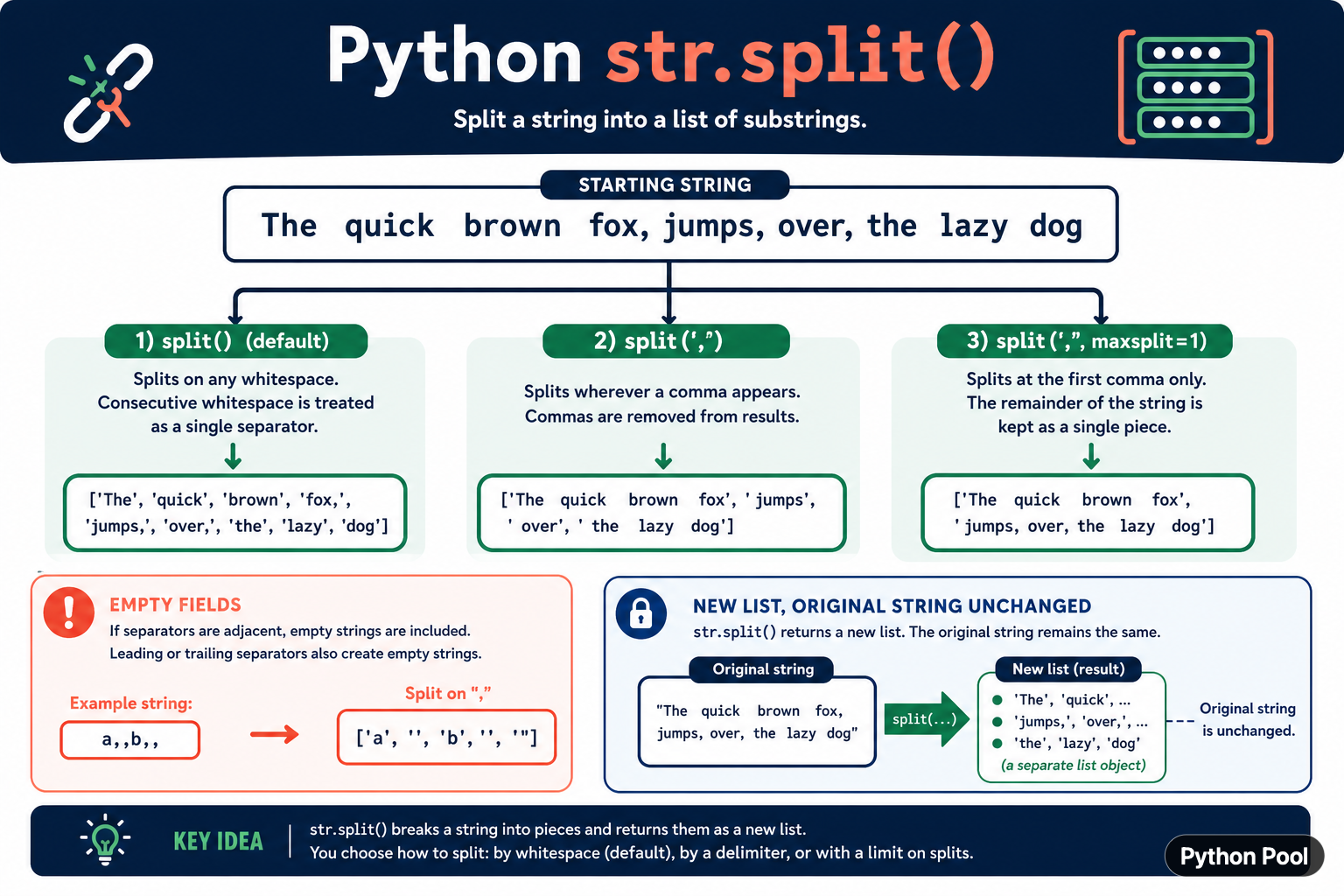
Python string split() breaks text into a new list of substrings. With no separator, it groups runs of whitespace and ignores leading or trailing whitespace. With an explicit separator, it cuts at that exact delimiter and can preserve empty fields. The optional maxsplit argument limits the number of cuts, which is useful when the final field may contain the separator.
Quick answer
Use text.split() for whitespace-separated words, text.split(",") for simple comma-delimited text, and text.split(":", 1) when only the first delimiter should be significant. The result is a new list and the original string is unchanged. Use a CSV parser for quoted, escaped, or multiline CSV instead of relying on split(",").
The official Python str.split documentation defines the difference between omitted and explicit separators, empty fields, and maxsplit. Those modes should be chosen deliberately because they produce different lists.
Split on whitespace
When sep is omitted or None, Python treats runs of whitespace as one separator and does not return empty strings for repeated spaces. This is convenient for sentences, command-like text, and simple logs.
text = "  Python   makes text readable  "
words = text.split()

print(words)
print(text)
The original string remains unchanged. Whitespace mode recognizes more than the literal space character, which is useful for mixed input but may be too permissive for a fixed-format protocol.
Split with an explicit delimiter
Passing a separator changes the rules. The delimiter is removed from the returned pieces, and adjacent delimiters can create empty strings. This behavior is useful when empty fields carry meaning.
record = "Ada,,Lovelace,"
fields = record.split(",")

print(fields)
print(len(fields))
Use an explicit separator when the data format says that a particular character separates fields. Do not use it as a general whitespace parser because repeated spaces, tabs, and empty values behave differently.
Limit the number of splits
maxsplit limits how many cuts occur from left to right. A value of one is useful for key-value text where the value may contain the same delimiter. The remainder is kept as one string.
header = "Content-Type: text/plain; charset=utf-8"
name, value = header.split(":", maxsplit=1)

print(name.strip())
print(value.strip())
Choose the direction that matches the format. rsplit() applies the limit from the right, which is useful when the final separator is the one that matters.
Split lines
Use splitlines() when the input contains line boundaries rather than an ordinary delimiter. It understands several line-boundary conventions and can optionally preserve line endings. This is clearer than chaining split("\n") when text may come from different platforms.
document = "first line\nsecond line\r\nthird line"
lines = document.splitlines()
lines_with_endings = document.splitlines(keepends=True)

print(lines)
print(lines_with_endings)
Decide whether the newline belongs in each returned item. Parsers that later write the lines back may need keepends=True; display code usually wants the endings removed.
Parse simple key-value text
A limited split is a good fit for a small, controlled format such as name=value. Validate the number of pieces and the required key before using the result. For a full configuration language, use the format's parser instead.
def parse_setting(line):
    key, separator, value = line.partition("=")
    if not separator:
        raise ValueError("setting must contain =")
    key = key.strip()
    if not key:
        raise ValueError("setting name is empty")
    return key, value.strip()

print(parse_setting("timeout = 10"))
partition() is sometimes better than split() because it always returns three values and makes the presence of the separator explicit. Use the tool whose return contract fits the parser.
Do not parse CSV with split()
Comma-separated files can contain quoted commas, escaped quotes, and embedded newlines. A simple split(",") cannot distinguish a comma inside a quoted field from a delimiter. Use Python's csv module for CSV data.
import csv
from io import StringIO

data = 'name,note\n"Ada","likes, commas"\n'
rows = list(csv.DictReader(StringIO(data)))

print(rows[0]["note"])
The same principle applies to paths, URLs, and structured logs: a separator-based shortcut is safe only when the format guarantees that the separator cannot appear unescaped inside a value.
Common mistakes
- Expecting
split()without a separator to preserve repeated spaces. - Forgetting that explicit delimiters can create empty fields.
- Using
maxsplitin the wrong direction for a key-value format. - Splitting lines with a literal newline when platform line endings vary.
- Parsing quoted CSV with a plain comma split.
The pragmatic workflow is to identify the input format, choose whitespace mode or an exact delimiter, set maxsplit when the remainder matters, and use a dedicated parser for structured formats. split() is simple because its rules are precise, not because every text format is simple.
Validate parsed fields
Splitting is only the first step in parsing. Check the number of fields, strip optional whitespace, validate required values, and report the original line when an input is malformed. Returning a partially parsed record can move a simple format error deeper into the application.
When a separator is optional, partition() can distinguish a missing delimiter from an empty value. When a separator is repeated, decide whether empty fields are meaningful or should be rejected. These decisions belong in the format contract and should be covered by tests.
Keep delimiters and encodings separate. A string split cannot identify byte-level boundaries in an encoded file, and it cannot interpret quoting or escaping unless the format parser explicitly supports those rules.
Use representative fixtures for empty input, leading and trailing separators, repeated delimiters, missing delimiters, and a delimiter inside a quoted value. These cases define the parser contract more effectively than a single happy-path sentence.
If the text comes from a user or network, reject unexpected field counts before indexing into the result. Clear validation errors are safer than an accidental IndexError later in the request.
For related string parsing, compare Python string length checks and removing characters before splitting. Read python string length and remove character from string python for the related workflow.
Frequently Asked Questions
Frequently Asked Questions
What does split() do in Python?
str.split() breaks a string into a new list of substrings using whitespace or an explicit separator.
What is the difference between split() and split(‘,’)?
split() without a separator groups whitespace, while split(‘,’) cuts at commas and can preserve empty fields.
How does maxsplit work?
maxsplit limits the number of cuts from left to right, keeping the remaining text as the final piece.
Should I parse CSV with split()?
No. Quoted or escaped CSV needs the csv module because a comma can occur inside a field.