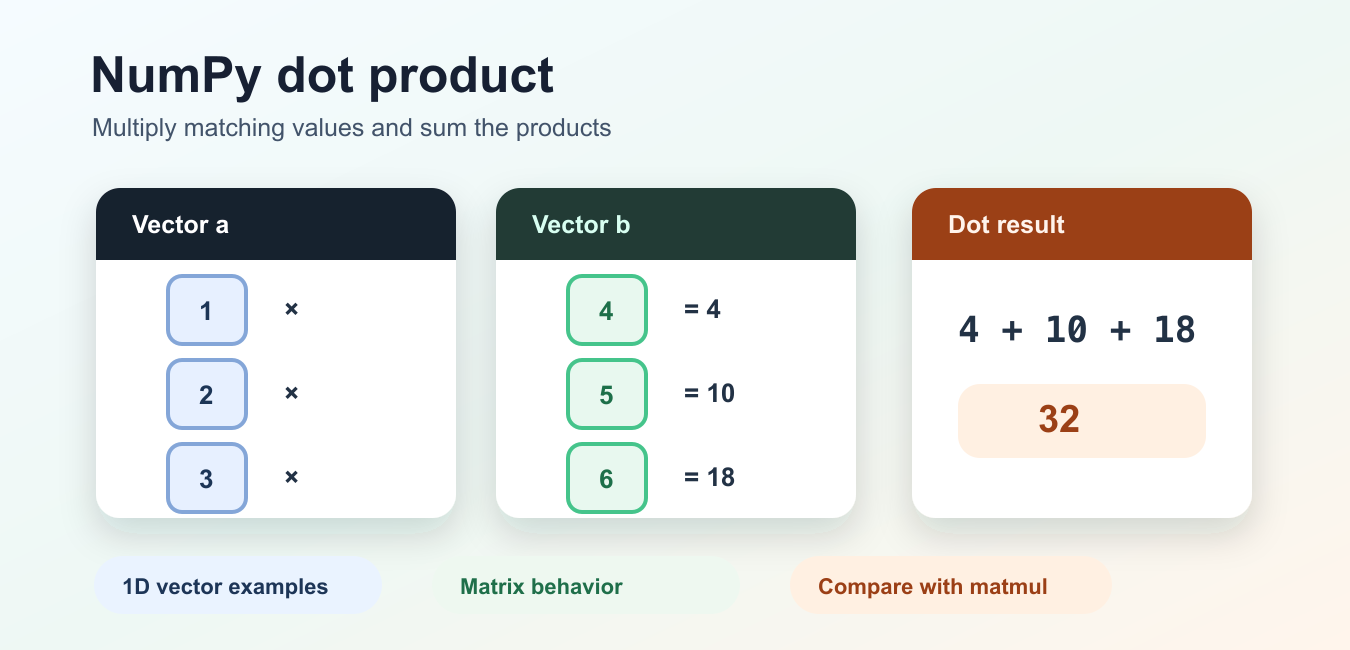
Quick answer: np.dot() has different behavior for scalars, 1D vectors, and 2D arrays. Check shapes before calling it: vectors produce a scalar inner product, while two 2D arrays use the last axis of the first and the second-to-last axis of the second.
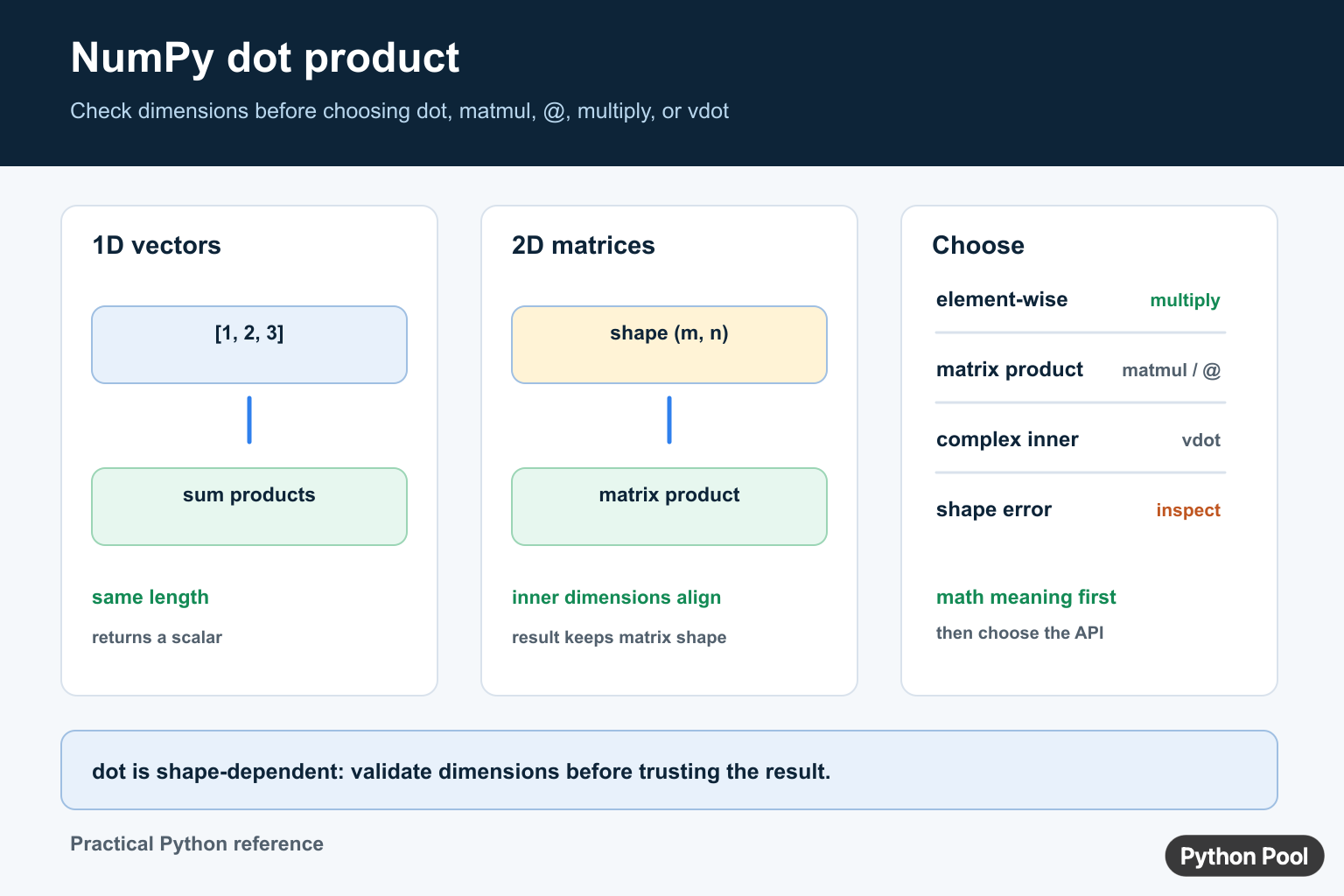
The NumPy dot product is a sum of multiplied values, but the exact output depends on the input dimensions. The official numpy.dot documentation defines these cases. For modern matrix multiplication, compare np.matmul() and the @ operator rather than assuming every use of dot() means the same thing.
Dot Product Of Two Vectors
For two one-dimensional arrays, np.dot() multiplies corresponding values and sums the products.
import numpy as np

left = np.array([1, 2, 3])
right = np.array([4, 5, 6])

result = np.dot(left, right)
print(result)  # 32
The calculation is 1 * 4 + 2 * 5 + 3 * 6. Both arrays must have the same length for this vector operation. If the vectors represent features, make the ordering and units consistent before multiplying them.
Check Shapes Before Dot
Shape checks make errors easier to diagnose than a failed operation deep inside a larger pipeline.
def dot_vectors(left, right):
    if left.ndim != 1 or right.ndim != 1:
        raise ValueError("expected two 1D vectors")
    if left.shape != right.shape:
        raise ValueError(f"shape mismatch: {left.shape} and {right.shape}")
    return np.dot(left, right)
Do not silently flatten arrays just to make shapes compatible. Flattening can discard the row and column meaning that a matrix operation needs.
Dot With Scalars
When both inputs are scalars, np.dot() behaves like multiplication. A scalar and an array are also multiplied element by element.
import numpy as np

print(np.dot(3, 4))
values = np.array([1, 2, 3])
print(np.dot(2, values))
If your intent is plainly element-wise scaling, write 2 * values. That communicates the operation more directly.
Dot With 2D Arrays
For two two-dimensional arrays, np.dot(a, b) produces the same kind of result as matrix multiplication.
import numpy as np

weights = np.array([[1, 2], [3, 4]])
features = np.array([[10, 20], [30, 40]])

print(np.dot(weights, features))
The inner dimensions must align. A shape of (2, 2) multiplied by (2, 2) returns (2, 2). For a (2, 3) array, the second array must have a compatible leading dimension.
Compare dot, matmul, And @
np.matmul() and @ are designed for matrix multiplication and handle stacked arrays according to matrix multiplication rules. The NumPy matmul documentation is the best reference when your data has batches or more than two dimensions.
import numpy as np

a = np.array([[1, 2], [3, 4]])
b = np.array([[5, 6], [7, 8]])

same_result = np.matmul(a, b)
operator_result = a @ b
assert np.array_equal(same_result, operator_result)
Use np.multiply() or a * b for element-wise multiplication. Choosing the operation from its mathematical meaning prevents accidental matrix products.
Complex Values And vdot
For complex numbers, np.dot() does not conjugate the first input. If a conjugate dot product is required, compare np.vdot() or an explicit conjugation.
import numpy as np

left = np.array([1 + 2j, 3 + 4j])
right = np.array([5 + 6j, 7 + 8j])

plain = np.dot(left, right)
conjugating = np.vdot(left, right)
print(plain, conjugating)
Make the convention explicit in numerical code, especially when implementing signal processing, inner-product spaces, or scientific formulas.
Validate Dtypes And Results
Inspect dtype, shape, and finite values when inputs come from files or user data.
if not np.isfinite(left).all() or not np.isfinite(right).all():
    raise ValueError("dot inputs must be finite")
For large calculations, consider the memory layout and the numeric type. A dot product can overflow a small integer type or lose precision when values vary greatly in scale.
Related NumPy topics include reshape and array shape, converting values with asarray, and checking spread with standard deviation.
Use Dot With A Batch Of Vectors
For a matrix of rows and one vector, matrix multiplication usually expresses the intention more clearly than relying on the higher-dimensional rules of dot().
import numpy as np

samples = np.array([[1, 2, 3], [4, 5, 6]])
weights = np.array([0.1, 0.2, 0.3])

scores = samples @ weights
print(scores.shape)
Here each row is a sample and each weight belongs to one feature. The result has one score per row. Naming the axes in the surrounding code prevents accidentally transposing samples and features.
Do Not Confuse Dot With Outer Product
A vector dot product returns one summed value. An outer product returns a matrix containing every pairwise multiplication.
import numpy as np

left = np.array([1, 2])
right = np.array([10, 20, 30])

inner = np.dot(left, left)
outer = np.outer(left, right)
print(inner)
print(outer.shape)
If the desired output is a table of pairwise combinations, choose np.outer() or a broadcasted multiplication. A scalar result is a strong signal that you requested an inner product instead.
Test Shape Contracts
Tests should cover both valid shapes and the errors that protect the contract.
import numpy as np
import pytest

def score(samples, weights):
    if samples.shape[-1] != weights.shape[0]:
        raise ValueError("feature count does not match weights")
    return samples @ weights

assert score(np.ones((2, 3)), np.ones(3)).shape == (2,)
with pytest.raises(ValueError):
    score(np.ones((2, 3)), np.ones(2))
The exact test framework is optional, but the principle is not: assert the meaning of each axis so a future refactor cannot turn a valid-looking calculation into a silently wrong one.
Keep The Operation Readable
Short examples often use np.dot(a, b), but production code benefits from variable names that describe axes and units. A vector called weights should have a documented feature order, and a matrix called samples should state whether rows or columns represent observations.
Do not use a dot product just because two arrays can be multiplied. Element-wise multiplication, a reduction, a matrix product, a convolution, and a complex inner product have different meanings. A quick shape assertion is useful, but it cannot prove that the axes represent the right real-world quantities.
When debugging an unexpected result, print the shapes, dtypes, and a small slice of each input before printing the result. This makes broadcasting and transposition mistakes visible without dumping an entire large array.
For reproducible numerical work, record the input shape and dtype alongside the output so a later comparison is based on the same contract.
Use a small hand-calculated example when verifying a new implementation. For [1, 2] and [3, 4], the inner product is 11, while the matrix product of two 2D arrays produces a full grid. This simple distinction catches many accidental reshapes.
If an operation is part of a machine-learning or scientific pipeline, name the axis convention in the function documentation. Shape-compatible arrays can still describe different quantities, and NumPy cannot infer that semantic mismatch for you.
That documentation is part of numerical correctness, not just style. Fully.
Frequently Asked Questions
What is the NumPy dot product of two vectors?
For two 1D arrays of the same length, np.dot() multiplies corresponding values and returns the sum of those products.
What shapes can np.dot() multiply?
The behavior depends on the dimensions: 1D inputs produce an inner product, while 2D inputs perform matrix-style multiplication and require aligned inner dimensions.
Should I use dot() or matmul() for matrix multiplication?
Use matmul() or the @ operator when matrix multiplication is the intended meaning, especially for arrays with batches or more than two dimensions.
What is the difference between dot() and vdot()?
vdot() conjugates the first complex input before calculating the inner product, while dot() does not conjugate it.