Quick Answer
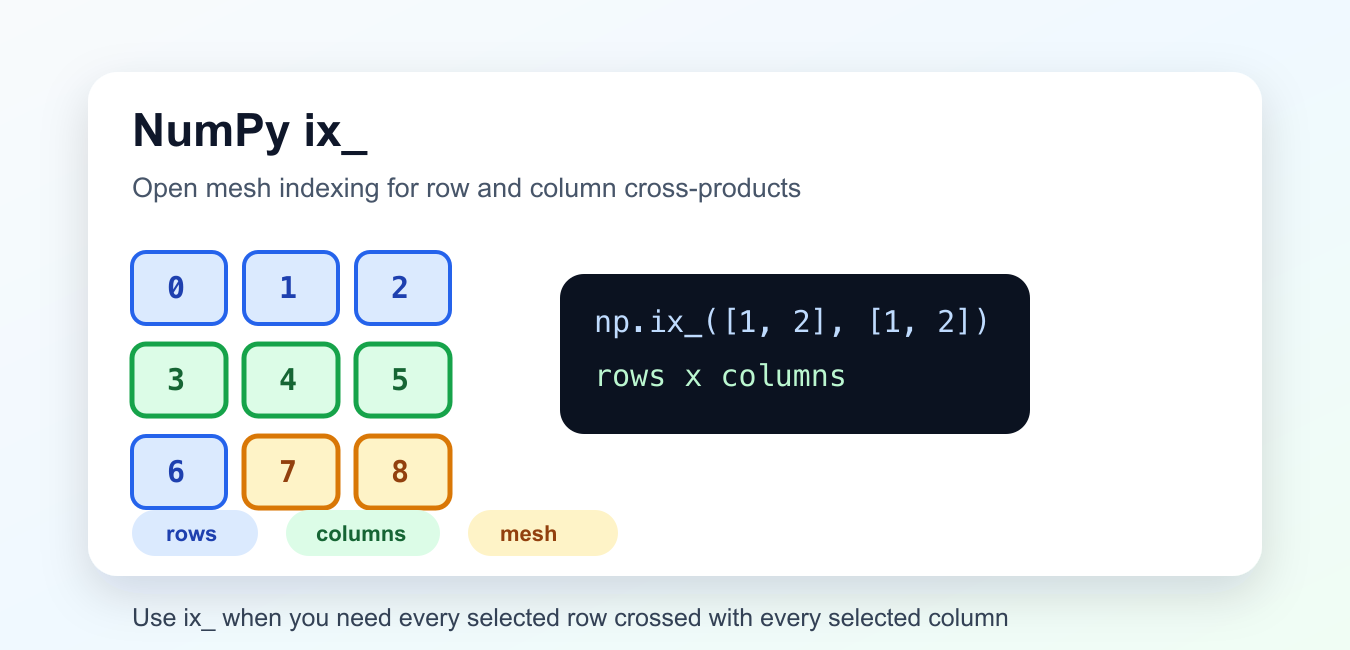
Pass one-dimensional row and column index sequences to np.ix_(), then use the result inside array indexing. It produces the cross-product of those selections, which is useful for extracting a rectangular submatrix.
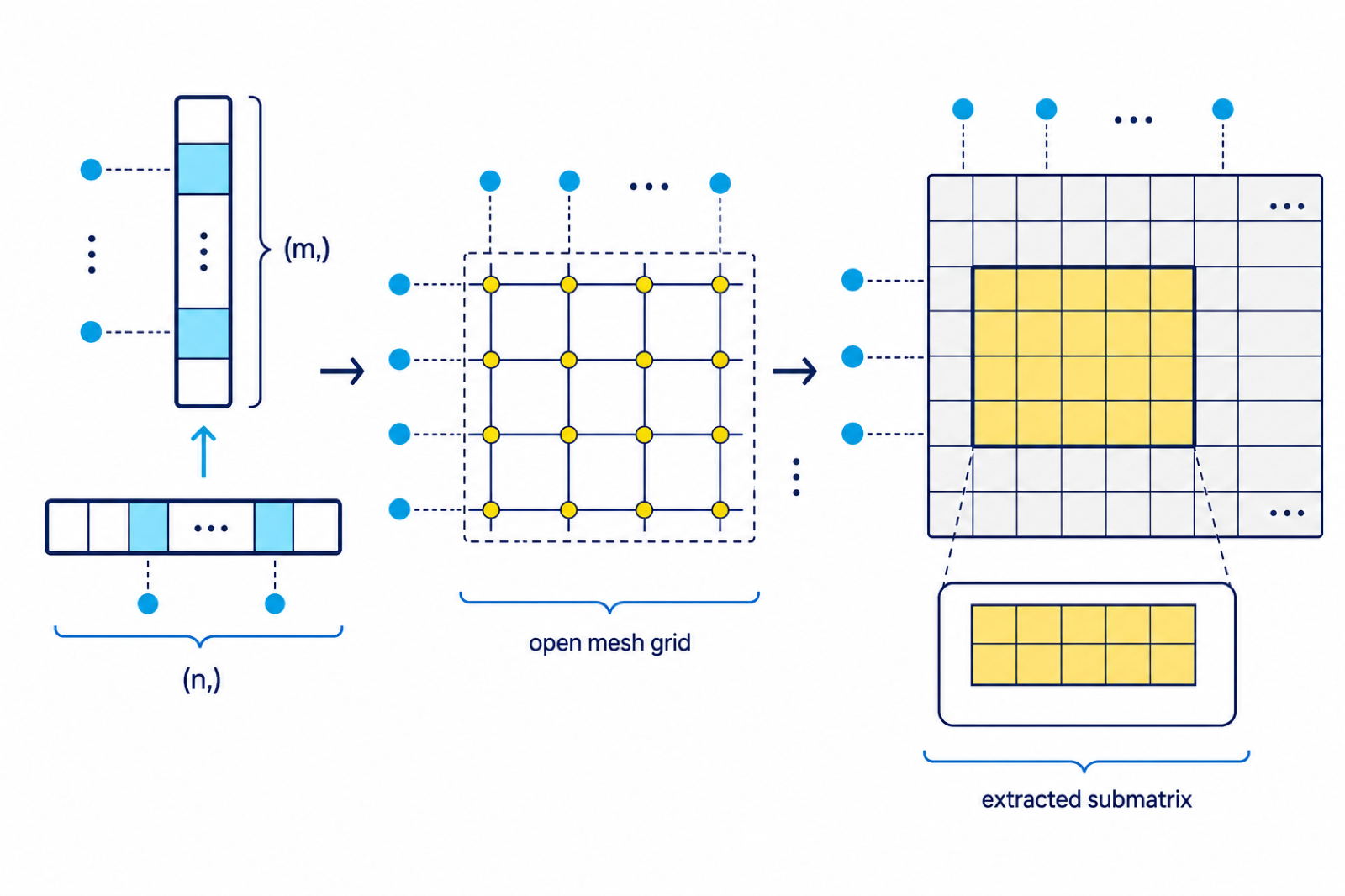
np.ix_() builds open mesh indexes from one-dimensional sequences. It is most often used to select the cross-product of rows and columns from a NumPy array.
The official NumPy ix_ documentation describes the helper, and the NumPy indexing guide explains the broader indexing rules. Related tools include NumPy meshgrid and NumPy ogrid.
Use ix_() when you want every selected row combined with every selected column. Without it, advanced indexing can pair positions element by element instead of building a rectangular selection.
The helper works by reshaping each one-dimensional selection so NumPy broadcasting creates an open mesh. You usually do not need to inspect that mesh directly; you pass it into array indexing.
This keeps indexing code short while still making the selection intent explicit.
Select Rows And Columns
The common use case is selecting a submatrix by row indexes and column indexes.
import numpy as np

data = np.arange(12).reshape(3, 4)
rows = [0, 2]
cols = [1, 3]

result = data[np.ix_(rows, cols)]

print(data)
print(result)
The result contains rows 0 and 2, crossed with columns 1 and 3. That gives a two-by-two submatrix.
This is different from selecting only paired coordinates. It keeps the rectangular shape implied by the row and column lists.
That shape preservation is the main benefit. The result looks like a smaller table cut out of the larger array, not a flat list of unrelated points.
Compare With Paired Advanced Indexing
Advanced indexing without ix_() can pair row and column positions.
import numpy as np

data = np.arange(12).reshape(3, 4)
rows = [0, 2]
cols = [1, 3]

paired = data[rows, cols]
crossed = data[np.ix_(rows, cols)]

print(paired)
print(crossed)
paired returns two items: data[0, 1] and data[2, 3]. crossed returns all row and column combinations.
Use this comparison when debugging unexpected shapes. It makes the difference between paired selection and mesh selection visible.
If the result has fewer dimensions than expected, check whether the index arrays were passed directly instead of through np.ix_().
Use Boolean Row Or Column Masks
ix_() accepts Boolean one-dimensional sequences as well as integer indexes.
import numpy as np

data = np.arange(20).reshape(4, 5)
row_mask = np.array([True, False, True, False])
col_mask = np.array([False, True, True, False, True])

selected = data[np.ix_(row_mask, col_mask)]

print(selected)
The masks choose rows and columns independently. The selected output still has a rectangular shape.
Boolean masks are useful when row or column choices come from comparisons rather than fixed index lists.
The mask length must match the axis it selects. A row mask should have one entry per row, and a column mask should have one entry per column.
Use ix_ With Labels Stored Separately
When labels and data are stored separately, ix_() can select matching rows and columns while labels explain the result.
import numpy as np

data = np.arange(16).reshape(4, 4)
names = np.array(["north", "south", "east", "west"])

rows = np.array([0, 3])
cols = np.array([1, 2])

selected = data[np.ix_(rows, cols)]

print(names[rows])
print(names[cols])
print(selected)
This keeps the numeric selection compact while still allowing readable labels in reports or debug output.
Make sure the label arrays stay aligned with the data axes. Indexing only works correctly when labels and rows or columns share the same order.
This pattern is common in small matrix reports where the numeric array is separate from axis labels. Select the labels with the same index sequences used for the data.
Index Three Dimensions
ix_() can take more than two one-dimensional inputs. Each input selects one axis.
import numpy as np

cube = np.arange(3 * 4 * 5).reshape(3, 4, 5)

axis0 = [0, 2]
axis1 = [1, 3]
axis2 = [0, 4]

selected = cube[np.ix_(axis0, axis1, axis2)]

print(selected.shape)
print(selected)
The output shape is based on the lengths of the index sequences: two choices for each of three axes.
This is useful for extracting blocks from higher-dimensional arrays without writing nested loops.
Higher-dimensional use is powerful, but it can be harder to read. Name each axis selection clearly so the final shape is predictable.
Build Index Sequences With NumPy
The row and column selections can be computed with NumPy operations before being passed to ix_().
import numpy as np

data = np.arange(25).reshape(5, 5)

rows = np.flatnonzero(np.array([True, False, True, False, True]))
cols = np.arange(0, data.shape[1], 2)

selected = data[np.ix_(rows, cols)]

print(rows)
print(cols)
print(selected)
This pattern is helpful when selections come from masks, ranges, or earlier calculations.
Keep the index arrays one-dimensional. ix_() is designed to turn one-dimensional selections into broadcastable open meshes.
If you already have full coordinate arrays, another indexing approach may be more appropriate. ix_() is for independent selections along each axis.
Common ix_ Mistakes
Do not use data[rows, cols] when you need every row crossed with every column. Use data[np.ix_(rows, cols)] for that rectangular result.
Do not pass multidimensional index arrays to ix_(). Flatten or compute one-dimensional selections first.
Do not forget that the output shape follows the number of selected items on each axis. If you choose two rows and three columns, expect a (2, 3) result.
The practical rule is simple: when rows and columns should form a grid of selections, wrap them with np.ix_() before indexing the array.
Use ix_() When the Selection Means Every Combination
Advanced indexing without ix_() pairs positions: the first row with the first column, the second row with the second column, and so on. Use an open mesh when the intent is every selected row crossed with every selected column.
import numpy as np

data = np.arange(20).reshape(4, 5)
rows = [0, 3]
cols = [1, 2, 4]

paired = data[rows, cols[:2]]
crossed = data[np.ix_(rows, cols)]
print(paired)
print(crossed.shape)
The crossed selection keeps the row-by-column shape. That makes downstream matrix operations and table-like transformations easier to reason about.
When the selected data needs conversion before further processing, compare NumPy asarray() and converting a NumPy array to a pandas DataFrame.
Frequently Asked Questions
What does np.ix_() return?
It returns broadcastable index arrays that form an open mesh from one-dimensional sequences. Passing them into array indexing selects every combination of the supplied indices.
How is np.ix_() different from data[rows, cols]?
data[rows, cols] pairs row and column positions. data[np.ix_(rows, cols)] creates the rectangular cross-product of all selected rows and columns.
Can np.ix_() select more than two dimensions?
Yes. It can build an open mesh from multiple one-dimensional sequences, provided the resulting broadcasted shape matches the indexing operation you intend.
Should I use np.ix_() or meshgrid()?
Use np.ix_() when you need index arrays for advanced indexing. Use meshgrid() when you need coordinate grids for numerical calculations or plotting.