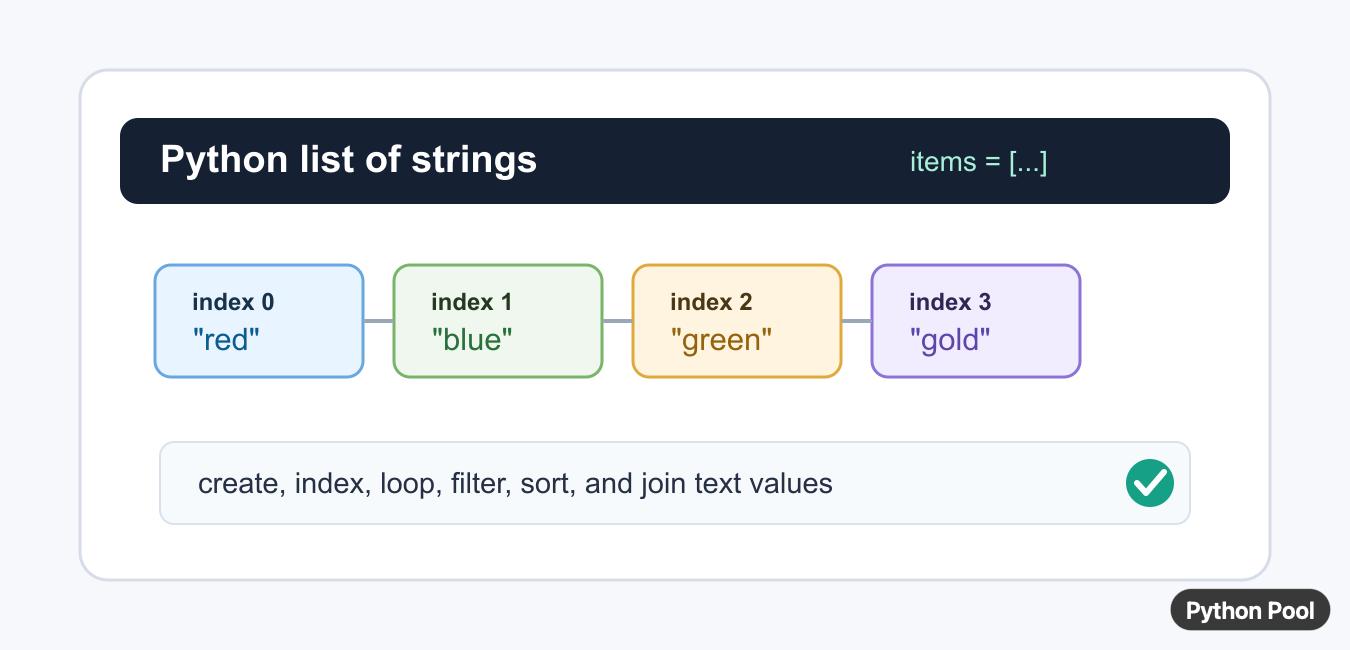
Quick answer: Use a Python list for a flexible array of strings, then choose a stricter or vectorized representation only when its dtype and operations fit the workload. Validate string values and decide how missing, Unicode, and empty data should behave.

An array of strings in Python is usually a list that stores text values. Python also has an array module, but that module is for compact numeric storage, not normal text collections. For everyday code, use a list such as ["red", "blue", "green"].
The official Python documentation covers lists and string objects.
Lists are ordered and mutable. Ordered means each string has a position. Mutable means you can append, remove, replace, or sort items without creating a completely new list. The strings inside the list are still immutable, so changing text usually means replacing an item with a new string.
Use a list of strings for names, tags, filenames, menu labels, CSV fields, command arguments, and cleaned form input. The important part is to choose one clear rule for the text: should spaces be kept, should case matter, and should empty strings be allowed?
It also helps to keep the list focused on one kind of text. A list of color names, a list of tags, or a list of command arguments is easy to validate. A mixed list with labels, numbers converted to text, and optional blanks is harder to reason about.
Create A List Of Strings
Put quoted text values inside square brackets to create a list.
colors = ["red", "blue", "green"]

print(colors)
print(type(colors))
print(type(colors[0]))
The list object stores the collection, and each item is a string. Use either single quotes or double quotes consistently with the style of the surrounding code.
A list can start empty and grow later with append(). That is useful when values come from user input, a file, or another loop.
Access And Replace Items
Use zero-based indexes to read or replace items.
names = ["ada", "grace", "linus"]

first_name = names[0]
names[1] = "guido"

print(first_name)
print(names)
names[0] returns the first string. Assigning to names[1] replaces the second item in the list.
If an index is outside the list, Python raises IndexError. Check the length first when the index comes from input or from another data source.
Negative indexes work too. names[-1] reads the last string, and names[-2] reads the item before it. Use negative indexes when the position is relative to the end of the list.
Loop Through Strings
A for loop reads each string in order. Use enumerate() when the position is also useful.
languages = ["Python", "SQL", "Bash"]

for index, language in enumerate(languages, start=1):
    print(index, language.upper())
This is clearer than manually tracking a counter. It also avoids mistakes when the list changes size.
Looping is the right choice when each string needs validation, formatting, logging, or a multi-step transformation.
Filter Empty Or Blank Strings
Lists from forms and files often contain blank items. A list comprehension can keep only text that has content after trimming spaces.
raw_items = ["apple", "", "  ", "banana", " cherry "]
clean_items = [item.strip() for item in raw_items if item.strip()]

print(clean_items)
This removes empty strings and whitespace-only strings, then stores trimmed text. Use this pattern before saving tags, names, search terms, or imported columns.
If blank values are errors instead of harmless noise, collect them and return a message instead of silently filtering them out.
Sort Strings Safely
sorted() returns a new sorted list. Use str.casefold as the key for case-insensitive sorting.
words = ["banana", "Apple", "cherry", "apricot"]
sorted_words = sorted(words, key=str.casefold)

print(sorted_words)
print(words)
The original list remains unchanged. Use words.sort() only when changing the existing list is the intended result.
Case-insensitive sorting makes display output more natural because uppercase and lowercase forms are compared by their folded text.

Join A List Into One String
Use separator.join(items) when every item is already a string.
parts = ["Python", "lists", "store", "strings"]
sentence = " ".join(parts)
csv_line = ",".join(parts)

print(sentence)
print(csv_line)
join() is better than repeated + concatenation when combining many strings. Choose the separator that matches the output format: a space for readable text, a comma for simple CSV-style output, or a newline for lines.
If the list contains numbers or other objects, convert them to strings first. A compact option is map(str, items), but a loop can be clearer when formatting rules differ by item.
For output that will be parsed later, prefer a real format such as CSV or JSON instead of building a custom string by hand. join() is best for simple display text or controlled separators.
The practical rule is simple: use a Python list for an array of strings, keep the text rules explicit, and choose the operation that matches the next step. Index when you need one item, loop when every item needs work, filter before saving messy input, sort for display, and join when producing final text.
Good tests should include an empty list, a one-item list, repeated strings, mixed case, and strings with leading or trailing spaces. Those cases catch most mistakes in text-list handling.
Use A List First
Lists accept arbitrary string objects, preserve order, and work with ordinary Python string methods. They are the clearest default when the collection is not a numeric array.
Understand Typed Arrays
The standard array module is primarily numeric and does not replace a general list of text. Do not choose a type code that cannot represent the actual values.
Consider NumPy
NumPy string and object dtypes can be useful in array-oriented workflows, but fixed-width strings, object references, Unicode behavior, and vectorized operation support should be measured.
Validate The Contract
Check whether every item is a str, how empty strings differ from missing values, and whether bytes should be rejected or decoded at the boundary.
Choose Storage By Use
Lists suit flexible application logic, while table or columnar libraries may suit large labeled datasets. Storage should follow downstream filtering, serialization, and performance needs.
Test Edge Values
Test empty collections, mixed types, Unicode, long strings, None, duplicate values, serialization, and the operations that will consume the representation.
Use the official Python data-structures documentation. Related Python Pool references include lists and NumPy arrays.
For related collection work, compare list behavior, array shapes, and type tests before choosing string storage.
Frequently Asked Questions
How do I create an array of strings in Python?
Use a list of strings for the general case, or choose a library such as NumPy when its dtype, vectorization, and memory behavior fit the workload.
Can Python’s array module store strings?
The standard array module is designed for numeric type codes, so a list or a string-focused library is usually more appropriate for arbitrary text.
How do I check that every item is a string?
Validate with an explicit predicate such as all(isinstance(item, str) for item in values) at the boundary where the data contract matters.
Which representation should I choose?
Choose lists for flexibility, NumPy for numerical or vectorized workflows that genuinely support string data, and a specialized columnar or table type when the surrounding system requires it.