
botocore.exceptions.NoCredentialsError: Unable to locate credentials means Boto3 reached an AWS request without finding usable credentials for that Python process. It is a credential-discovery problem, not automatically an IAM permissions problem. The reliable fix is to identify which credential source the process is supposed to use, configure that source, and verify the active AWS identity without printing secret values.
Quick answer
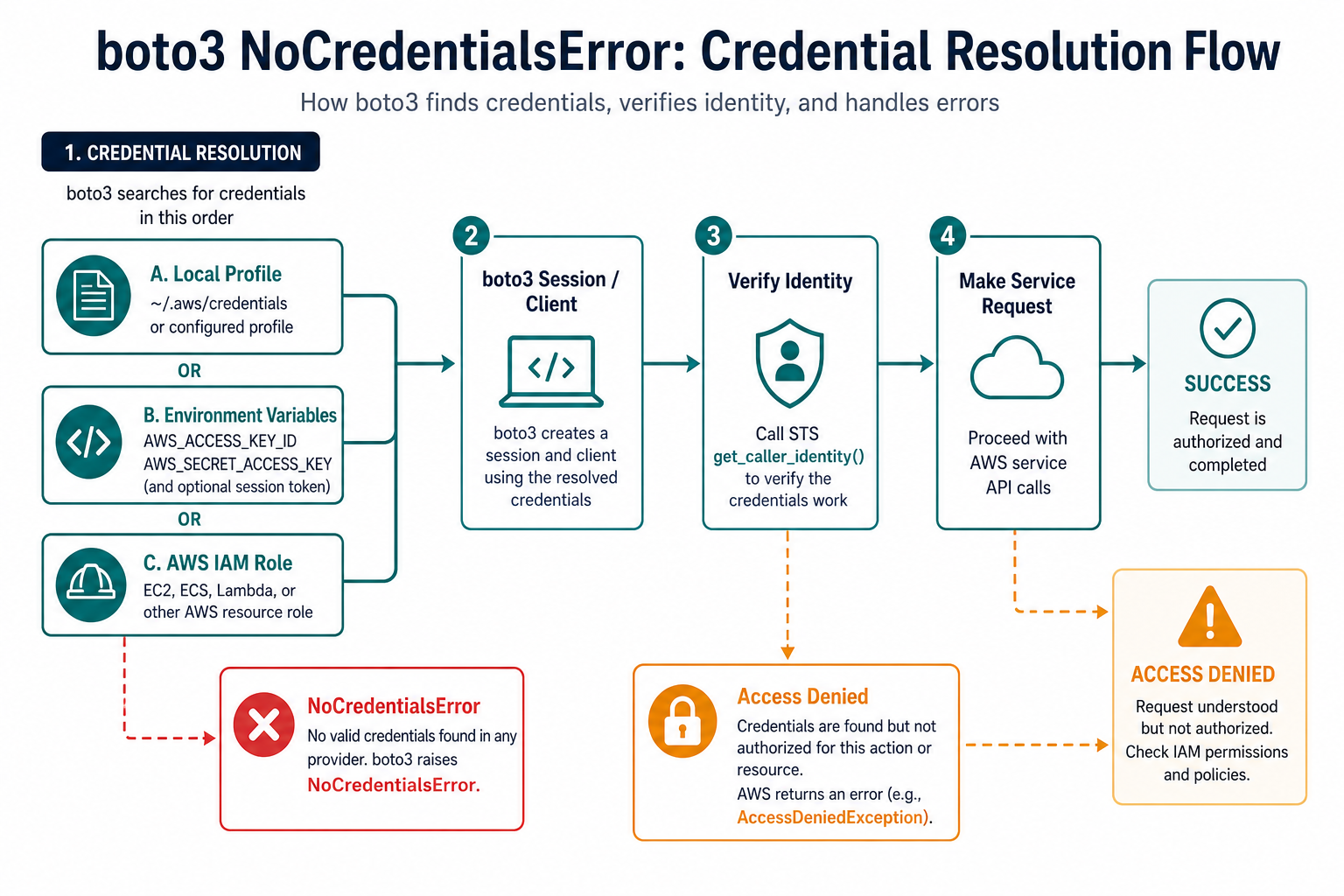
For local development, select an AWS shared profile with boto3.Session(profile_name=...) or configure the standard environment variables. For deployed workloads, prefer an IAM role supplied by the runtime. Then call STS get_caller_identity() from the same environment before calling S3, DynamoDB, or another service. If that identity check succeeds but the service call returns AccessDenied, credentials were found and the next problem is authorization.
Boto3 documents a credential provider chain that searches several locations and stops when it finds credentials. The order includes explicit client or session arguments, environment variables, role providers, shared files, container credentials, and EC2 instance metadata. The active profile, home directory, process environment, and runtime therefore matter. A script that works in a terminal can fail under a scheduler or web server because it runs as a different user with a different environment.
Use the Boto3 credentials guide, the AWS CLI config-file guide, and the AWS CLI environment-variable guide as the source of truth. The examples below keep secrets out of output and source control.
Separate missing credentials from access denied
First test identity. A missing credential error means the provider chain found nothing usable. An access-denied response means AWS accepted the request far enough to evaluate permissions. Separating those cases prevents you from editing IAM policies when the process simply has no credentials.
import boto3
from botocore.exceptions import NoCredentialsError, ClientError

try:
    identity = boto3.client("sts").get_caller_identity()
    print(identity["Arn"])
except NoCredentialsError:
    print("No credentials were found for this process.")
except ClientError as error:
    print("Credentials were found, but STS rejected the request.")
    print(error.response["Error"]["Code"])
Do not print access keys, secret keys, session tokens, or full configuration files while debugging. The caller identity contains an account and ARN, which is useful for confirming the selected account without exposing a secret.
Use a named profile on a developer machine
A named profile is usually the clearest local setup because account selection is explicit and the secret stays in the AWS credential files. The profile must exist for the same operating-system user that runs the Python command.
import boto3

session = boto3.Session(
    profile_name="dev",
    region_name="us-east-1",
)

print(session.profile_name)
print(session.region_name)
identity = session.client("sts").get_caller_identity()
print(identity["Account"])
If this raises a profile error, compare the spelling with the profile name created by the AWS CLI. If the profile loads but the identity call fails, check the file permissions, the home directory, and whether the process is using a virtual environment or service account that points somewhere else.
Build service clients from the same session
Mixing a profile-specific session with a separate global client can make debugging confusing. Create the session once and build the service clients from it so credentials and region selection travel together.
import boto3

def make_s3_client(profile_name, region_name="us-east-1"):
    session = boto3.Session(
        profile_name=profile_name,
        region_name=region_name,
    )
    return session.client("s3")

s3 = make_s3_client("dev")
print(s3.meta.region_name)
This pattern also makes tests easier because a session factory can be replaced with a fake or a mock. Keep the profile decision at the application boundary rather than scattering it across individual service calls.
Check environment variables safely
Some local shells, CI systems, and hosting platforms inject credentials through environment variables. Check presence, not values. Temporary credentials also need a session token, so an access key and secret key alone may be incomplete.
import os

names = [
    "AWS_ACCESS_KEY_ID",
    "AWS_SECRET_ACCESS_KEY",
    "AWS_SESSION_TOKEN",
]

for name in names:
    state = "present" if os.environ.get(name) else "missing"
    print(name, state)
Environment variables can be absent because a process manager does not inherit the interactive shell, a CI secret was not attached to the job, or the application runs under a different account. Restart the process after changing the environment and test from the same command that runs the application.
Prefer IAM roles in production
On EC2, ECS, EKS, Lambda, and other AWS-managed environments, prefer an IAM role over long-lived access keys. The runtime can provide short-lived credentials through the documented provider chain. Your application then creates a normal client without embedding credentials.
import boto3

def make_runtime_client(region_name="us-east-1"):
    return boto3.client("s3", region_name=region_name)

s3 = make_runtime_client()
print(s3.meta.region_name)
If the role-based client fails, check the role attachment, trust policy, permissions policy, and runtime credential endpoint. Network restrictions can matter for container or instance metadata. A role that exists in one environment is not automatically available to another.
Do not confuse region errors with credential errors
A missing region often produces a different configuration error. Still, region and credential settings are frequently mixed together in a profile, so print only non-secret configuration such as the selected region and profile name. Use the same session for the identity check and the service client.
import boto3

session = boto3.Session()
print("profile:", session.profile_name)
print("region:", session.region_name)

if session.region_name is None:
    raise RuntimeError("Choose an AWS region before making a request")
Production checklist
- Run
get_caller_identity()from the exact failing process. - Choose one intended source: profile, environment, or runtime role.
- Check the current user, home directory, profile name, and region.
- Keep credentials out of code, logs, notebooks, screenshots, and Git.
- After identity succeeds, investigate IAM permissions separately.
The practical rule is to make credential selection observable without exposing secrets. Verify the identity first, then make the service request. This turns a vague NoCredentialsError into a short, testable configuration path.
Test the same configuration in automation
Local success does not prove that a scheduled job, container, or web worker has the same credentials. Record the selected profile and region, not secret values, in a diagnostic log. Run the identity check as part of a health command that uses the same operating-system user, working directory, and environment as the real job.
For CI, attach secrets through the platform’s protected store or use an identity federation mechanism supported by the platform. For AWS workloads, an IAM role usually gives a cleaner rotation story than copying access keys into deployment variables. Remove temporary debug output after the issue is resolved.
For AWS request setup and local configuration, compare signing requests with managing a dotenv import safely. Read python creating aws request signatures and fixed modulenotfounderror no module named dotenv for the related workflow.
For the authoritative API and current behavior, consult the Boto3 credential documentation.
Frequently Asked Questions
Frequently Asked Questions
How do I fix botocore NoCredentialsError?
Configure a Boto3 profile, environment variables, or an IAM role for the exact process that runs the code, then verify it with STS get_caller_identity().
Where does Boto3 look for credentials?
Boto3 checks several providers, including explicit session settings, environment variables, shared AWS files, container credentials, and EC2 instance metadata.
Why does Boto3 work in my terminal but not in a service?
The service may run as another user with a different home directory or environment. Test the credential source from the same process and account that runs the application.
What is the difference between NoCredentialsError and AccessDenied?
NoCredentialsError means no usable credentials were found. AccessDenied means credentials were found but the identity is not authorized for the requested action.