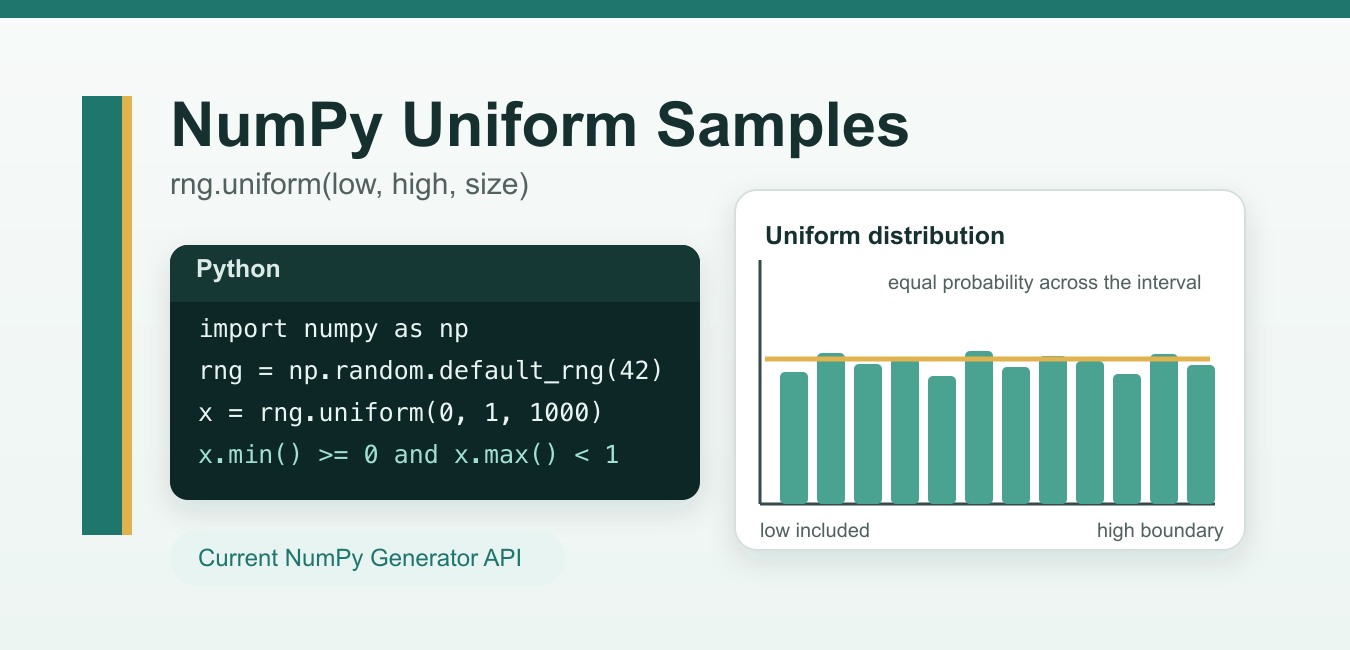
Quick answer: Generate uniform samples with a NumPy random Generator by defining low, high, and size. Use a local seeded generator for reproducible tests and experiments, and validate bounds, output shape, dtype, and the statistical assumptions of the downstream task.
numpy.random.uniform generates floating-point samples from a uniform distribution. For new NumPy code, the recommended pattern is to create a random number generator with np.random.default_rng() and call rng.uniform() from that generator.
A uniform distribution means every value in the interval has the same probability density. In NumPy, the usual interval is [low, high): low is included and high is treated as the upper boundary. The official docs also note a floating-point rounding edge case where the high value can appear, so avoid writing code that depends on the exact endpoint.
Recommended syntax
import numpy as np

rng = np.random.default_rng(seed=42)
values = rng.uniform(low=0.0, high=1.0, size=5)
print(values)
The important part is rng = np.random.default_rng(seed=42). It creates an independent Generator object, which NumPy recommends for new random sampling code. Using a seed is optional, but it makes examples, tests, and notebooks reproducible.
Parameters
| Parameter | Meaning | Example |
|---|---|---|
low |
Lower boundary of the interval. Defaults to 0.0. |
low=-1 |
high |
Upper boundary of the interval. Defaults to 1.0. |
high=1 |
size |
Shape of the output. Use an integer for a 1D array or a tuple for multi-dimensional output. | size=(2, 3) |
If size is omitted and both boundaries are scalar values, NumPy returns a single scalar. If size is supplied, it returns a NumPy array with that shape.
Generate values between 0 and 1
import numpy as np

rng = np.random.default_rng(7)
sample = rng.uniform(size=6)
print(sample)
Because low and high default to 0.0 and 1.0, this returns six floating-point values from the interval [0, 1). For a related overview of NumPy random routines, see our guide to NumPy random functions.
Generate values in a custom range
import numpy as np

rng = np.random.default_rng(7)
temperatures = rng.uniform(low=18.0, high=30.0, size=10)
print(temperatures)
This creates ten simulated values from 18.0 up to, but usually not including, 30.0. This pattern is useful for simulations, randomized inputs, synthetic datasets, and quick tests where continuous values are needed.
Create a 2D array of uniform samples
import numpy as np

rng = np.random.default_rng(7)
matrix = rng.uniform(low=-1.0, high=1.0, size=(3, 4))
print(matrix)
The tuple (3, 4) asks NumPy for three rows and four columns. This is a common setup when you need random feature values, initial weights, or a test matrix. If you later need to move array output into a tabular workflow, see how to convert a NumPy array to a Pandas DataFrame.
Use different ranges for each column
low and high can also be array-like. NumPy broadcasts those boundaries across the requested output shape.
import numpy as np

rng = np.random.default_rng(7)
low = np.array([0.0, 10.0, 100.0])
high = np.array([1.0, 20.0, 200.0])

rows = rng.uniform(low=low, high=high, size=(4, 3))
print(rows)
Here each column uses a different interval: [0, 1), [10, 20), and [100, 200). This keeps the code vectorized and avoids a Python loop.
Legacy np.random.uniform vs Generator.uniform
You will still see older examples that call np.random.uniform() directly:
import numpy as np

values = np.random.uniform(low=0.0, high=1.0, size=5)
This legacy function still works, but NumPy recommends Generator.uniform() for new code because it avoids relying on a shared global random state. The older style is acceptable when maintaining existing scripts, but new tutorials, tests, and applications should prefer default_rng().
When to use uniform, random, integers, and permutation
| Need | Use |
|---|---|
| Continuous floats in a custom range | rng.uniform(low, high, size) |
Continuous floats from [0, 1) |
rng.random(size) |
| Whole numbers | rng.integers(low, high, size) |
| Shuffle or randomize order | rng.permutation() |
For ordering problems, read our separate guide to NumPy random permutation.
Common mistakes
Expecting integers: uniform() returns floats. Use rng.integers() when you need integer values.
Forgetting the output shape: size=5 gives a 1D array with five values, while size=(5, 1) gives a two-dimensional column-shaped array.
Using global seeds everywhere: Prefer np.random.default_rng(seed) for reproducible code. It makes the random state explicit and local to the generator.
Passing an invalid range: Keep high greater than or equal to low. With Generator.uniform(), the difference high - low must be non-negative.
Official references
- NumPy documentation for
Generator.uniform() - NumPy documentation for legacy
numpy.random.uniform() - NumPy documentation for
default_rng()andGenerator
Conclusion
Use rng.uniform(low, high, size) when you need floating-point values sampled evenly from a range. For current NumPy code, create a generator with np.random.default_rng(), pass a seed when you need reproducible output, and choose size carefully so the returned array has the shape your program expects.
Define The Interval
The uniform method uses a lower and upper bound with documented endpoint behavior. Keep the bound units and scale explicit, especially when samples feed a simulation or a normalized feature.
Use A Modern Generator
Create a numpy.random.default_rng instance and call its uniform method instead of relying on shared global state. Passing the generator into a function makes randomness a visible dependency.
Choose The Output Shape
size can produce a scalar, vector, or multidimensional array. Treat the shape as part of the API and test it so broadcasting later does not silently produce a different dataset.
Make Experiments Reproducible
A known seed is useful for tests and repeatable experiments, but it is not a substitute for cryptographic randomness. Record the generator choice and seed policy when results need to be reproduced.
Check Numerical Edges
Validate that high is not below low and inspect values near the boundaries. Floating-point rounding can produce a value extremely close to a bound, so do not build brittle exact-equality assertions.
Test Distribution Assumptions
Test seed repeatability, different sizes, scalar and array bounds, invalid ranges, finite outputs, and a basic range or distribution sanity check. Avoid treating one small sample as proof of uniformity.
The official NumPy uniform documentation defines bounds, size, and generator behavior. Related Python Pool references include NumPy arrays and tests.
For related sampling workflows, compare sample arrays, seed and range tests, and sequence sizes before using uniform values.
Frequently Asked Questions
How do I generate uniform random numbers with NumPy?
Use a NumPy random Generator and its uniform method with low, high, and size values that match the intended interval and shape.
Is the high endpoint included?
The documented interval is generally low inclusive and high exclusive, though floating-point rounding can produce values close to the boundary.
How do I make NumPy random values reproducible?
Create a Generator with a known seed for tests or experiments, and avoid relying on global random state in reusable code.
What should I validate before sampling?
Check that high is not below low, choose a sensible size, and confirm the dtype and range are appropriate for the downstream calculation.