
Quick answer: For a non-empty numeric list, calculate the average with sum(values) / len(values) or statistics.mean(values). Use fmean() for floating-point data and NumPy mean() for array workflows, and define what an empty list or NaN should mean.
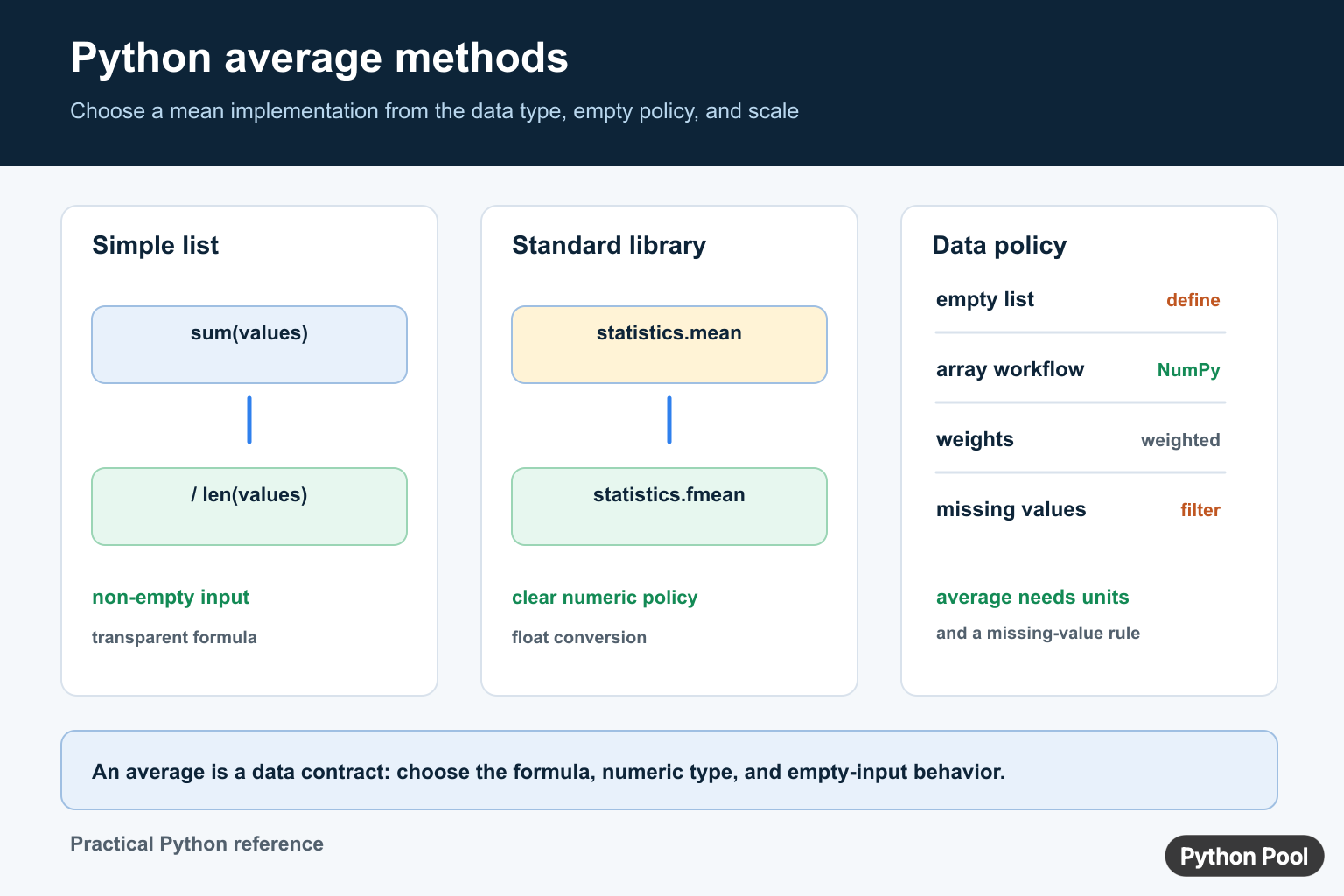
To find the average of a list in Python, divide the sum of the numbers by the number of items: sum(numbers) / len(numbers). For production code, handle empty lists first. For statistical code, statistics.mean() or statistics.fmean() is often clearer. For arrays and data science work, use numpy.mean(). The arithmetic mean starts with a total; Python sum() Function Guide covers sum() for generators, start values, nested data, and numeric edge cases.
Quick Answer: sum() / len()
The built-in sum() function adds numeric values, and len() returns the number of items. Together, they give the arithmetic mean for a normal list of numbers.
numbers = [2, 4, 6, 8]
average = sum(numbers) / len(numbers)

print(average)
This is the most direct method when the list is known to contain numeric values and is not empty. It returns a float when division is needed, even if all inputs are integers.
Handle Empty Lists Safely
An empty list has length zero, so dividing by len(numbers) raises ZeroDivisionError. Decide what an empty list means in your program before calculating the average. Returning None is often better than pretending the average is zero.
def average_or_none(numbers):
    if not numbers:
        return None
    return sum(numbers) / len(numbers)

print(average_or_none([10, 20, 30]))
print(average_or_none([]))
This pattern pairs well with list checks such as checking whether a list is empty. If your values come from input, clean and validate them before averaging; see Python user input for related patterns.
Use statistics.mean()
The standard library statistics.mean() function is designed for averages and reads clearly. It accepts a sequence or iterable of numeric data and raises StatisticsError if the data is empty.
from statistics import mean

scores = [81, 92, 77, 90]
print(mean(scores))
Use mean() when readability matters and you want a statistics-focused API. It is also a good choice when you want your code to say exactly what it is doing.
Use statistics.fmean() for Float Averages
statistics.fmean() converts data to floats and returns a floating-point mean. It is useful for numeric datasets where a float result is expected.
from statistics import fmean

values = [1, 2, 3, 4, 5]
print(fmean(values))
If you are working with mixed numeric types, read the result type carefully. For a broader review of numeric objects, see Python data types.
Use NumPy mean() for Arrays
For array calculations, use numpy.mean(). It can calculate the mean of a whole array or along a specific axis, which makes it the right tool for matrix, column, and data-science workflows.
import numpy as np

array = np.array([[1, 2, 3], [4, 5, 6]])

print(np.mean(array))
print(np.mean(array, axis=0))
NumPy is overkill for a tiny plain Python list, but it is the right choice when the data is already in an array. For output cleanup, see NumPy round, and for table conversion see NumPy array to Pandas DataFrame.
Average Numeric Strings
If the list contains strings, convert them to numbers first. Do not average strings directly. Strip whitespace, convert each value, then run the average calculation.
raw_values = ["10", "20", "30"]
numbers = [float(value) for value in raw_values]

print(sum(numbers) / len(numbers))
Use int() for whole-number strings and float() for decimal strings. If invalid text is possible, validate the list before converting.
Use reduce() Only When It Adds Clarity
The functools.reduce() function can accumulate values, but it is usually less readable than sum() for an average. It is included here because you may see it in older examples.
from functools import reduce
from operator import add

numbers = [3, 6, 9]
total = reduce(add, numbers)
average = total / len(numbers)

print(average)
For most code, prefer sum(numbers) / len(numbers), statistics.mean(), or statistics.fmean(). Save reduce() for cases where the reduction logic is genuinely more complex than addition.
Common Mistakes
The most common mistake is skipping the empty-list case. The second is averaging values that have not been converted from text yet. The third is hiding bad data by replacing invalid values with zero before checking whether zero is meaningful. A clean average should be calculated from values that have already passed validation.
Also remember that the arithmetic mean is sensitive to extreme values. If one number is much larger or smaller than the rest, the average may not describe the group well. In that case, consider whether a median, a trimmed dataset, or a separate outlier report would be more useful than a simple average.
Which Average Method Should You Use?
| Situation | Recommended method |
|---|---|
| Small list of numbers | sum(numbers) / len(numbers) |
| Readable standard-library code | statistics.mean(numbers) |
| Float result expected | statistics.fmean(numbers) |
| NumPy arrays | np.mean(array) |
| Moving windows | Use a moving average pattern |
If you need rolling windows instead of one overall average, see moving average in Python. For formatting final values, Python round is often the next step. If you remove values before averaging, our list pop guide may help.
Summary
The best default for a simple Python average is sum(numbers) / len(numbers) with an empty-list guard. Use statistics.mean() or fmean() when you want clearer statistical intent, and use numpy.mean() when your data is already in arrays.
Average Is A Data Contract
An average is meaningful only when the values share a unit and the empty-input policy is defined. A list of temperatures, durations, or scores can be averaged, but a mixed list of unrelated quantities cannot be repaired by choosing a different function.
from statistics import mean

def average(values):
    if not values:
        return None
    return mean(values)

print(average([10, 20, 30]))
print(average([]))
Consider Precision And Missing Values
statistics.mean() is a clear standard-library choice. statistics.fmean() converts values to floats, while NumPy is useful when the data is already an array or must be processed in bulk. Decide whether missing values should be rejected, filtered, or represented by a sentinel before averaging.
An arithmetic average is not a weighted average, median, or average rate. If observations have different weights or intervals, use the matching formula and document it. For streaming data, maintain a count and a running total instead of storing every value when that is sufficient.
Frequently Asked Questions
How do I find the average of a Python list?
For a non-empty numeric list, use sum(values) / len(values) or statistics.mean(values).
What happens when the list is empty?
sum(values) / len(values) raises ZeroDivisionError and statistics.mean() raises StatisticsError, so define whether to return None, raise, or use another policy.
What is the difference between mean() and fmean()?
statistics.mean() preserves more numeric-type behavior, while fmean() converts values to floats and is intended for floating-point arithmetic.
When should I use NumPy mean()?
Use np.mean() when the data is already an ndarray or a larger numerical workflow benefits from vectorized operations and array semantics.